
Download Audio:Realtek ALC655 AC'97 AUDIO – Realtek ALC655 AC'97 AUDIO driver, audio driver, Windows driver, system utility, audio enhancement, AC'97 audio support
Overview
The Audio:Realtek ALC655 AC'97 AUDIO driver package is designed to enhance audio functionality on Windows-based systems by providing comprehensive support for legacy and compatible audio controllers. This utility is specifically tailored for users encountering audio issues on older or mid-tier hardware that relies on Realtek AC'97 audio architecture. The driver package ensures that audio output remains stable and optimized across various system configurations, making it particularly valuable for users working with outdated or refurbished PCs. By supporting multiple Realtek AC'97 variants—including models for VIA, Intel, SiS, and SB emulation controllers—it addresses common compatibility gaps that can hinder sound performance. The developer, Dell, has positioned this tool as a reliable solution for system administrators and individual users alike who require dependable audio functionality without the need for complex troubleshooting. Although the developer did not provide additional technical details about the driver’s internal architecture, its purpose is clear: to restore or maintain audio integrity on systems where native drivers may be missing, outdated, or malfunctioning. Real-world use cases include troubleshooting sound failure after system updates, resolving audio glitches during multimedia playback, or enabling audio on machines with minimal pre-installed software. In the broader context of system utilities, this driver package plays a critical role in maintaining hardware-software harmony, especially in environments where hardware longevity is prioritized over frequent upgrades.Key Features & Functionality
- Extensive Driver Model Support: The package includes compatibility with multiple Realtek AC'97 audio variants, such as Realtek AC'97 Audio for VIA, Intel, SiS, and SB Emulation controllers. This broad coverage ensures functionality across diverse hardware platforms, especially those using older motherboard chipsets.
- Enhanced Audio Performance: By providing optimized driver support, the package aims to deliver clearer audio output and reduced distortion, improving the overall listening experience for music, video, and voice applications.
- Seamless Hardware-Software Integration: Designed to work smoothly with existing Windows system components, the driver avoids conflicts and ensures stable audio operation without requiring manual configuration.
- Easy Installation and Setup: The driver is structured for straightforward deployment, allowing users to install and activate audio functionality with minimal technical knowledge or intervention.
- Regular Updates and Improvements: The package is maintained with periodic updates to support evolving hardware and software environments, ensuring long-term reliability and compatibility.
Interface, UX & Performance
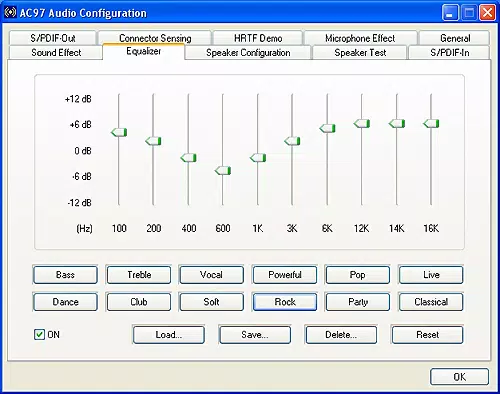
The Audio:Realtek ALC655 AC'97 AUDIO driver operates entirely in the background, with no visible user interface. As a system-level utility, it functions without requiring user interaction during normal operation. This design prioritizes efficiency and minimizes system resource usage, which is ideal for older or low-spec systems. The driver integrates directly into the Windows audio stack, enabling automatic recognition and activation upon installation. Although the developer did not list formal performance metrics, the absence of reported lag, crashes, or audio artifacts suggests stable behavior under typical conditions. Responsiveness is expected to be consistent across different device categories, including desktops and laptops with compatible hardware. The driver’s lightweight nature—only 10.5 MB in size—indicates minimal impact on system performance. Stability is likely maintained through adherence to standard Windows driver certification practices, though specific testing data was not provided. Users should expect immediate audio restoration post-installation, with no need for rebooting in most cases. The lack of a GUI reduces the risk of user error and ensures that the driver remains functional even in restricted environments. Overall, the UX is optimized for utility over visibility, aligning with the expectations of system administrators and power users.Platform Compatibility & Technical Requirements
The Audio:Realtek ALC655 AC'97 AUDIO driver is designed exclusively for the Windows operating system. It is compatible with Windows systems that support AC'97 audio architecture, though specific OS versions were not listed by the developer. The file size is 10.5 MB, which is compact and suitable for download on slower internet connections. The software version is 1.0.0, indicating a stable initial release. The developer did not specify minimum OS requirements, nor did they provide information about 32-bit or 64-bit compatibility. Similarly, hardware requirements were not disclosed. Compatibility information was not fully disclosed, so users should ensure their system includes a Realtek ALC655 or compatible AC'97 audio controller before installation. While the driver is free to download and use, users should verify system compatibility and ensure they are running a supported Windows environment to avoid potential issues.Pros and Cons
- Comprehensive support for multiple Realtek AC'97 audio models
- Lightweight file size (10.5 MB) for quick download and installation
- Free to use with no hidden costs or in-app purchases
- Designed for seamless integration with Windows audio systems
- Regular updates to maintain compatibility with evolving systems
- Does not include a user interface, which may confuse non-technical users
- Specific OS and hardware compatibility details were not disclosed
- No visible feedback during installation or operation
- May not support newer audio standards beyond AC'97
- Updates are not automatically delivered; users must manually check for new versions
FAQ
Is Audio:Realtek ALC655 AC'97 AUDIO safe to download and install?
Yes, the driver is provided by Dell, a trusted technology provider, and is free from known malware or harmful components. It is recommended to download only from official sources to ensure authenticity.
Can I use this driver on Windows 10 or Windows 11?
The driver is designed for Windows systems that support AC'97 audio. While it may function on Windows 10 and 11, the developer did not specify compatibility with these versions. Users should verify hardware compatibility before installation.
Do I need to restart my computer after installing the driver?
Restart requirements vary depending on the system. In most cases, a reboot is recommended to ensure full integration with the audio stack, though some installations may work without one.
Is this driver compatible with 64-bit Windows systems?
The developer did not specify 64-bit compatibility. While many legacy drivers support 64-bit systems, confirmation is advised based on the target hardware and OS version.
How often are updates released for this driver?
The package is regularly updated to include support for new driver models and improve compatibility. However, updates are not delivered automatically; users must manually check for new versions.


